
Data Governance
UTM Best Practices for GA4: A Complete Governance Guide
If your GA4 reports show traffic sources you don’t recognize, channels split into fragments, or a growing pile of “Unassigned” sessions, inconsistent UTM parameters are almost certainly the cause. This guide covers everything you need to build a clean, consistent UTM system that your whole team can follow.
What Are UTM Parameters?
UTM parameters are short tags you append to URLs to tell Google Analytics where a visitor came from. GA4 reads these tags when someone clicks your link and uses them to populate your Traffic Acquisition reports.
There are five standard UTM parameters:
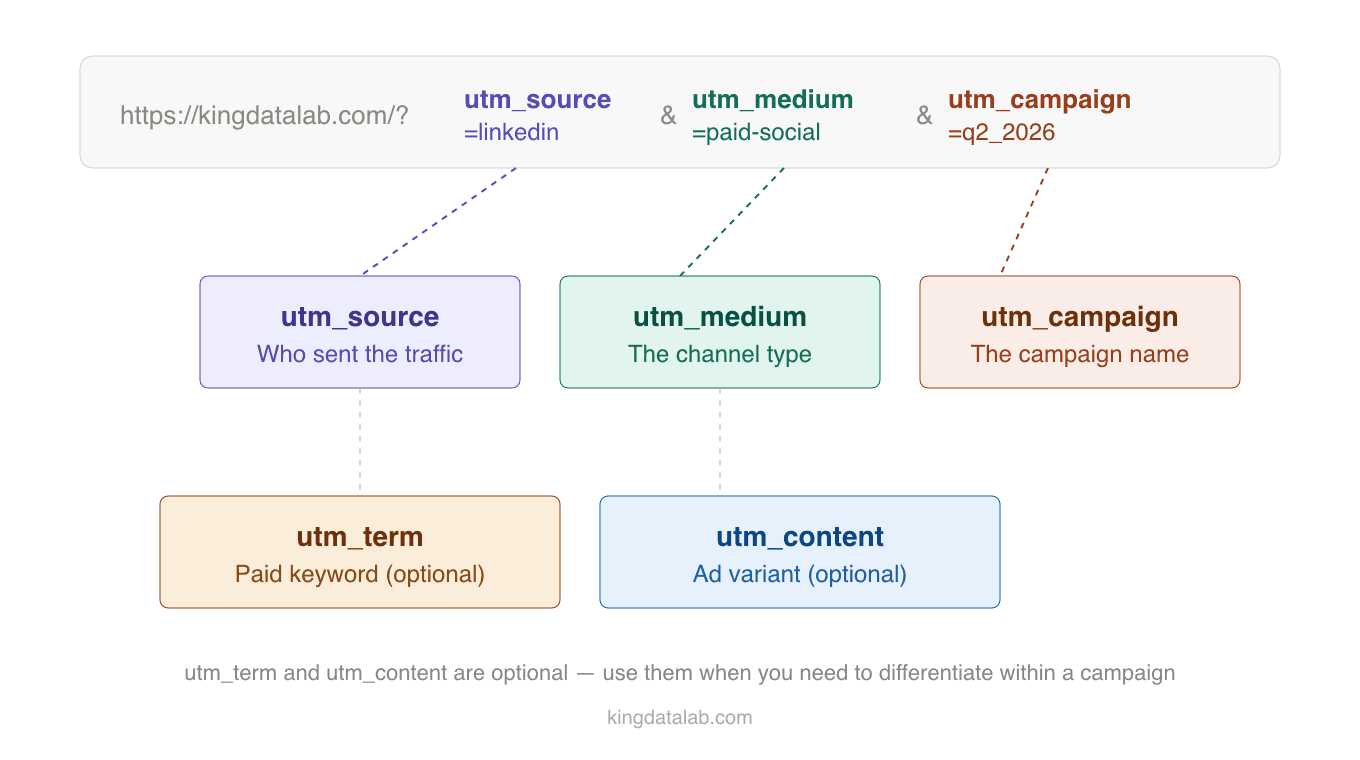
- utm_source — Where the traffic originates. Examples:
google,linkedin,newsletter - utm_medium — The marketing channel type. Examples:
cpc,email,social - utm_campaign — The specific campaign name. Examples:
spring_2026,brand_awareness_q2 - utm_term — The paid keyword, primarily for paid search. Examples:
marketing_analytics_consultant - utm_content — Used to differentiate ads or links within the same campaign. Examples:
hero_cta,sidebar_banner
A properly tagged URL looks like this:
https://kingdatalab.com/?utm_source=linkedin&utm_medium=social&utm_campaign=spring_2026
GA4 reads those parameters on arrival and attributes the session correctly. When they are missing or inconsistent, GA4 has to guess and it usually guesses wrong.
How GA4 Uses UTMs to Assign Channel Groups
GA4’s default channel groupings (Organic Search, Paid Search, Email, Organic Social, and so on) are determined by a combination of your UTM values and the referrer data GA4 collects automatically. Understanding this mapping is important because it explains why small UTM errors have outsized reporting consequences.
Here are the key rules GA4 applies:
- Traffic with
utm_medium=cpcorutm_medium=ppcmaps to Paid Search - Traffic with
utm_medium=emailmaps to Email - Traffic with
utm_medium=socialorutm_medium=social-networkmaps to Organic Social - Traffic with
utm_medium=affiliatemaps to Affiliates - Traffic that doesn’t match any known medium often lands in Unassigned
If you tag a paid LinkedIn campaign with utm_medium=LinkedIn instead of utm_medium=paid-social, GA4 won’t recognize it. That session either gets misclassified or ends up in Unassigned, making your paid social ROI invisible in reports.
utm_medium=Email, another writes utm_medium=email, and a third writes utm_medium=e-mail. GA4 treats all three as different mediums. The fix isn’t technical. It’s governance.UTM Governance Best Practices
1. Always use lowercase
GA4 is case-sensitive for UTM values. utm_source=LinkedIn and utm_source=linkedin are treated as two completely different sources, splitting your data in half. Enforce a rule across your team: all UTM values are lowercase, always, no exceptions.
2. Use underscores instead of spaces
Spaces in URLs get encoded as %20, which makes your campaign names unreadable in reports and can cause parsing errors in some tools. Use underscores to separate words: spring_campaign_2026 not spring campaign 2026.
3. Standardize your medium values
Pick a fixed list of medium values and stick to it. A solid starting set that aligns with GA4’s default channel groupings:
cpcfor all paid searchpaid-socialfor all paid socialemailfor all email campaignssocialfor organic social postsaffiliatefor affiliate or partner linksdisplayfor display and banner advertising
Document this list in a shared governance doc that every person who touches links can reference.
4. Build a campaign naming convention
Campaign names should be consistent and descriptive enough that someone unfamiliar with the campaign can understand it from the report. A reliable format is [initiative]_[audience]_[quarter]. For example: brand_awareness_smb_q2_2026.
Avoid generic names like test, campaign1, or retargeting. These accumulate over time and become impossible to interpret months later.
5. Always tag every paid link
Any link you control that drives traffic to your site should have UTM parameters. This includes paid ads, email campaigns, social posts (especially LinkedIn where referral data is often stripped), influencer links, podcast show notes, and partner placements.
Direct traffic in GA4 is a catch-all for sessions where GA4 can’t determine a source. A significant portion of what shows up as Direct is actually untagged marketing traffic.
6. Never tag internal links
This is a common mistake that causes serious data corruption. If you add UTM parameters to links between pages on your own site, GA4 treats each click as a new session from that UTM source, overwriting the original traffic source and breaking your attribution entirely. UTMs are for external links only.
Build clean, consistently formatted UTM links in seconds with no spreadsheet required.
Paste existing campaign links to check them against GA4 best practices before they go live.
How to Audit Your Existing UTM Data
If you’ve been running campaigns for a while without strict governance, you likely have fragmented historical data. Here’s how to assess the damage and start cleaning it up.
Step 1: Pull your Traffic Acquisition report in GA4
Go to Reports, then Acquisition, then Traffic Acquisition. Change the primary dimension to “Session source / medium” and sort by sessions descending. Look for anything that looks like a duplicate. Seeing linkedin / social and LinkedIn / Social and linkedin.com / referral all appearing separately is a clear red flag.
Step 2: Look for Unassigned traffic
Any sessions showing “Unassigned” as the channel represent traffic GA4 couldn’t categorize. Some of this is unavoidable (dark social, direct), but a large Unassigned bucket usually means UTMs are missing or malformed on paid or owned channels.
Step 3: Check your medium values
In the same report, look at the “Session medium” column. Any medium that isn’t on your approved list is a governance gap. Common culprits include Social vs social, Email vs email, or invented mediums like newsletter_blast.
Step 4: Build a correction list and update going forward
You can’t retroactively fix historical GA4 data. Once it’s recorded incorrectly it stays that way. But you can document what was wrong, correct it in your UTM builder and governance doc, and ensure every new campaign is tagged correctly from here on. Within one to two reporting cycles, your data quality will improve noticeably.
Common UTM Mistakes and How to Fix Them
Using the full domain as utm_source
Writing utm_source=linkedin.com instead of utm_source=linkedin causes problems in GA4’s channel grouping logic and creates inconsistency when the same platform appears as both a UTM source and a referrer. Use the platform name only with no domain extension.
Tagging the same campaign differently across platforms
If your Q2 brand campaign is called brand_q2_2026 in Google Ads and Q2-Brand-Campaign in LinkedIn, you can’t aggregate performance across channels in a single report. Use identical campaign names everywhere for campaigns you want to compare cross channel.
Skipping utm_content on multi-variant campaigns
If you’re running two different ad creatives or two different CTAs in the same campaign, you need utm_content to distinguish them. Without it, you can’t tell which creative drove conversions. You just see aggregated numbers that could be hiding a significant performance gap between variants.
Auto-tagging conflicts in Google Ads
Google Ads uses its own auto-tagging system (gclid) alongside UTMs. If you have both enabled and they conflict, GA4 can double count or misattribute sessions. If you’re using manual UTMs on Google Ads, make sure auto-tagging is either disabled or configured to not override your UTM values. You can check this in Google Ads under Account Settings and then Auto-tagging.
Setting Up a UTM Governance System for Your Team
The best UTM practices in the world don’t matter if only one person follows them. A governance system means everyone who creates links (marketers, agencies, contractors) follows the same rules automatically.
A minimal governance system has three components:
- A naming convention document. A single shared reference that defines approved values for source, medium, and campaign format. One page is enough. Put it somewhere everyone can find it such as Notion, Google Docs, or your internal wiki.
- A shared UTM builder. Instead of people building links manually and introducing typos, a builder enforces lowercase and approved values automatically. Our UTM Builder does this for free.
- A regular audit cadence. Monthly or quarterly, pull the Traffic Acquisition report and look for new inconsistencies. Catch them early before they compound into six months of fragmented data.
Frequently Asked Questions
What happens if I don’t use UTM parameters?
Without UTMs, GA4 relies on referrer data alone to attribute traffic. Referrer data is increasingly unreliable because browsers strip it for privacy, HTTPS to HTTP transitions lose it, and apps like LinkedIn and email clients often don’t pass it at all. The result is a growing Direct channel that masks where your traffic actually comes from.
Do UTMs affect SEO?
UTM parameters on external links don’t affect your search rankings. Google’s crawler ignores UTM values when evaluating pages. The only SEO consideration is making sure you never add UTMs to internal links on your own site, which can cause duplicate content issues if GA4 session data bleeds into crawl behavior.
What’s the difference between utm_source and utm_medium?
Think of source as the who and medium as the how. Source identifies the platform or publisher such as google, linkedin, or newsletter. Medium identifies the channel type such as cpc, social, or email. GA4 uses medium primarily to assign channel groups, so getting medium right is more important for reporting accuracy than getting source right.
Why does GA4 show “Unassigned” traffic?
Unassigned appears when GA4 can’t match a session to any of its default channel group rules. The most common causes are UTMs with medium values GA4 doesn’t recognize, missing UTMs on paid campaigns, and direct traffic from apps or tools that don’t pass referrer data. A large Unassigned bucket is usually a sign that UTM governance needs attention.
Should I use UTMs on organic social posts?
Yes. Social platforms, especially LinkedIn, frequently strip referrer data before passing clicks to your site. Without UTMs, LinkedIn traffic often shows up as Direct in GA4. Tagging organic social posts with utm_source=linkedin and utm_medium=social ensures it gets attributed correctly.
How do I check if my UTMs are working in GA4?
The fastest way is to click your tagged link from an incognito browser, then check GA4’s Realtime report under Reports and then Realtime. Within a minute you should see an active user whose source and medium match your UTM values. If it shows as Direct or Organic, something is wrong with the tag.
Not sure if your UTM setup is working correctly?
Run our free Analytics Health Check. It takes two minutes and gives you a clear picture of where your tracking has gaps, including UTM governance.